
Your WordPress Site Is at Risk in 2025: PHP 7.4 Has Been Unsupported for 3+ Years
A forced PHP 8 Upgrade is on the horizon. Many hosts are now removing old PHP versions or forcing upgrades. Avoid sudden site errors, security exposure, and broken donation/checkout forms
PHP is the programming language WordPress runs on—the “engine” behind your website.
PHP 7.4 has been end-of-life since November 28, 2022, meaning it no longer receives security updates from the PHP project.
And WordPress now recommends PHP 8.3 or greater.
Why this matters right now:
- Major hosts automatically upgrade (and sometimes can’t defer it) once a PHP version is end-of-life. WP Engine
- PHP 8.1 reaches end of life on December 31, 2025, accelerating the “forced upgrade” trend across hosting platforms. PHP
- WordPress.org stats tracked in Core discussions show As of early December 2025, 31.9% of active WordPress sites are running PHP 7.4 or lower—equating to tens (and potentially over a hundred) million websites worldwide, meaning you’re far from the only one dealing with this—but it’s exactly why hosts are pushing changes
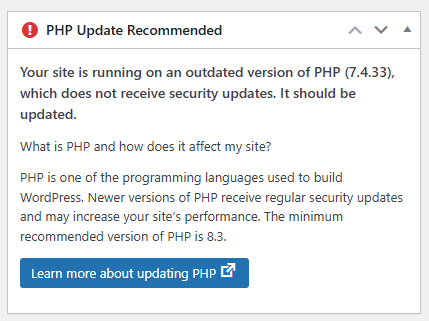
PHP Update Recommended – If you see this in your WordPress Dashboard, it’s showing that your website is still running the out of date older php, and needs updating!
What You Gain by Moving to PHP 8.3 / 8.4
- Better security
Unsupported PHP versions don’t receive patches—leaving known vulnerabilities unaddressed. - Better compatibility (and fewer “mystery breakages”)
Modern themes/plugins increasingly assume PHP 8+. Staying on 7.4 raises the chance that an update (or a host change) breaks your site. - Future-proofing
WordPress recommends PHP 8.3+, and hosts are actively retiring older PHP versions.
The Big Risk: “Just Flip It to PHP 8” Can Take Your Site Down
Upgrading PHP can expose outdated plugin/theme code and cause errors—sometimes even fatal errors that take the site offline.
That’s why we don’t run the PHP 8 upgrade directly on your live site.
Safe PHP Upgrade Service (Only $99)
For $99, we’ll upgrade your WordPress site to a current, supported PHP version (typically PHP 8.3 or 8.4) using a staged process designed to minimize downtime and surprises
What’s included:
- Staging upgrade + testing
- Compatibility triage and fixes up to 1 hour
- Clear report of any issues and next-step recommendations
- Live upgrade after your approval
Our 5-Step “No Surprises” Upgrade Process
1) Create a Staging Environment
We create a safe staging copy (using your host staging if available, or a trusted staging tool) so your live site stays unaffected.
2) Update WordPress + Plugins + Theme (on staging)
We update WordPress core, your active theme, and plugins (where updates are available) to reduce compatibility issues before changing PHP.
3) Upgrade Staging to PHP 8.3 / 8.4 and Test Everything
We test critical site paths such as:
- Contact forms / donation forms / checkout flows
- Membership logins
- Key pages, menus, and search
- Admin/editor workflows (if you publish content regularly)
If we find issues, we document them and apply fixes where practical.
Important: The base $99 includes up to 1 hour of compatibility fixes/mitigation. If the site needs deeper work (custom code refactors, replacing legacy plugins, theme rebuild work), we’ll provide a clear estimate before proceeding.
4) Staging Site Approval
You review the staging site and approve the upgrade before anything changes on live.
5) Upgrade the Live Site
Once approved, we repeat the proven steps on your live environment. Minimal downtime, controlled change, and a working site on PHP 8.
Order your PHP 8 Upgrade
FAQs
What is PHP, and why does my WordPress site need it?
When did PHP 7.4 become unsupported?
Which PHP version do you upgrade to?
Will upgrading PHP break my plugins or theme?
Will my live website go down during the php upgrade?
What if my site has serious compatibility issues?
Does the $99 include fixing everything?
What access do you need?
Why am I seeing “PHP Update Recommended” in WordPress?
Is “PHP Update Recommended” urgent, or can I ignore it?
Ready to upgrade?
- Staging-first process — no risky live flips.
- Transparent scope: $99 includes upgrade + testing + 1 hour of fixes.
- You approve staging before we touch live.